The brief
I want to buy a house near Togoshi-Ginza in Shinagawa, rent it on Airbnb so it roughly pays for itself, and keep it as my family’s base in Tokyo.
The research made one thing clear: the whole plan depends on zoning. Shinagawa allows three kinds of short-term rental, and the gap between them is huge:
- 簡易宿所 (a simple-lodging license under the ryokan law) — no limit on nights, but only on land zoned commercial, semi-industrial or certain residential categories.
- Minpaku — capped at 180 nights a year.
- Minpaku in residential-only zones — weekends only, about 104 nights. That never pays for itself.
Most houses sit in residential-only zones. So the job was to find listings on the right parcels, in a language I don’t read fluently, before someone else does.
How it works
The project started as a handoff: a research report, a calculator and a rough zoning map, plus a README written as a brief for Claude Code. The first prompt pointed Claude at that brief and the empty GitHub repo. By the end of the first day there were three tools, all deployed on one Cloudflare Worker.
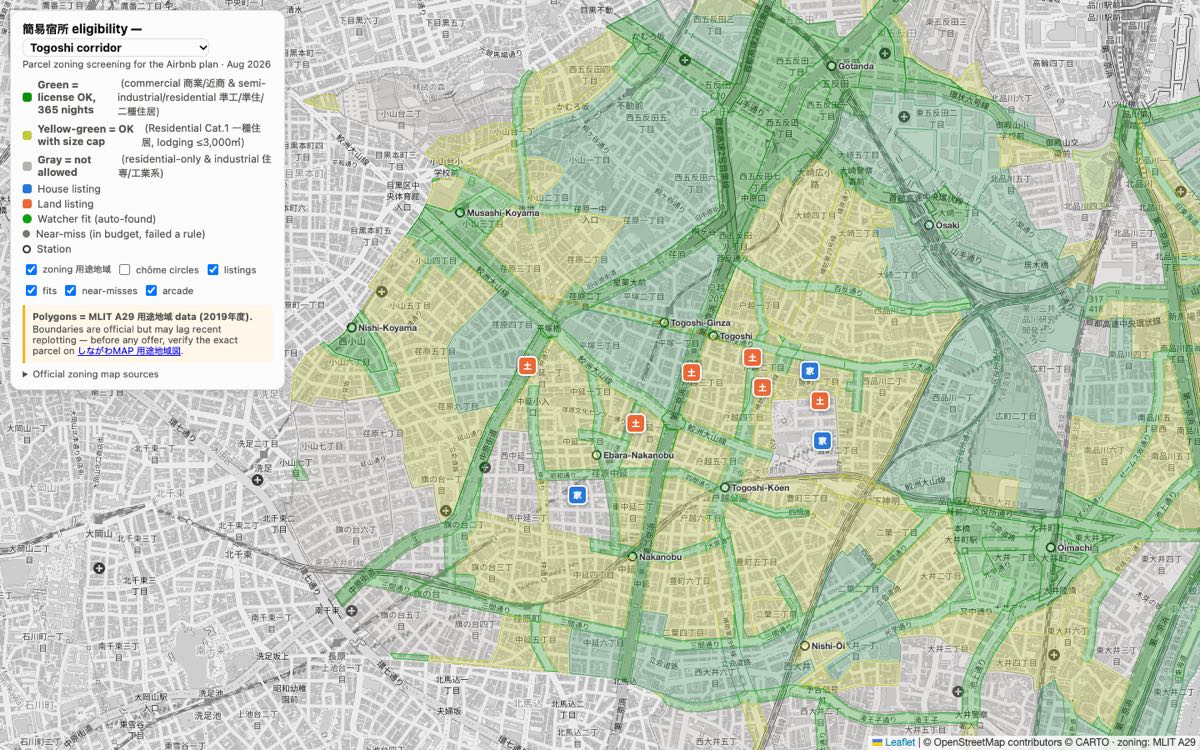
The zoning map. Official zoning boundaries from Japan’s land ministry (MLIT open data), drawn over the neighborhood and colored by whether the license is possible. Green means 365 nights, yellow-green means allowed with a size cap, gray means no.
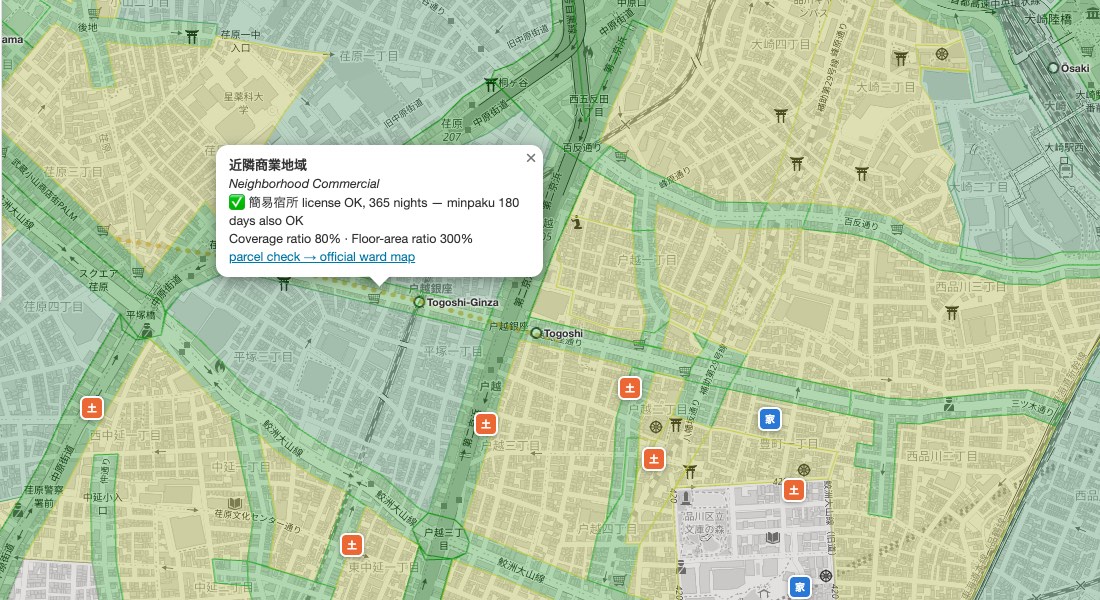
The first version was mostly Japanese. I asked for English, and now every zone carries its translated name, a plain yes/no on the license, and its building limits.
The listing watcher. Once an hour, the Worker reads a few pages from LIFULL HOME’S, a large Japanese listing site. I’d asked for SUUMO. Claude came back with a better source: LIFULL’s detail pages publish each parcel’s actual zoning, in structured data it can read without parsing the page layout. A listing is a fit when the zoning is eligible, the walk to a station is eight minutes or less, and a house has at least two bedrooms. Fits go on the map and trigger an email. Everything else shows up as a gray “near-miss” dot with the reason it failed.
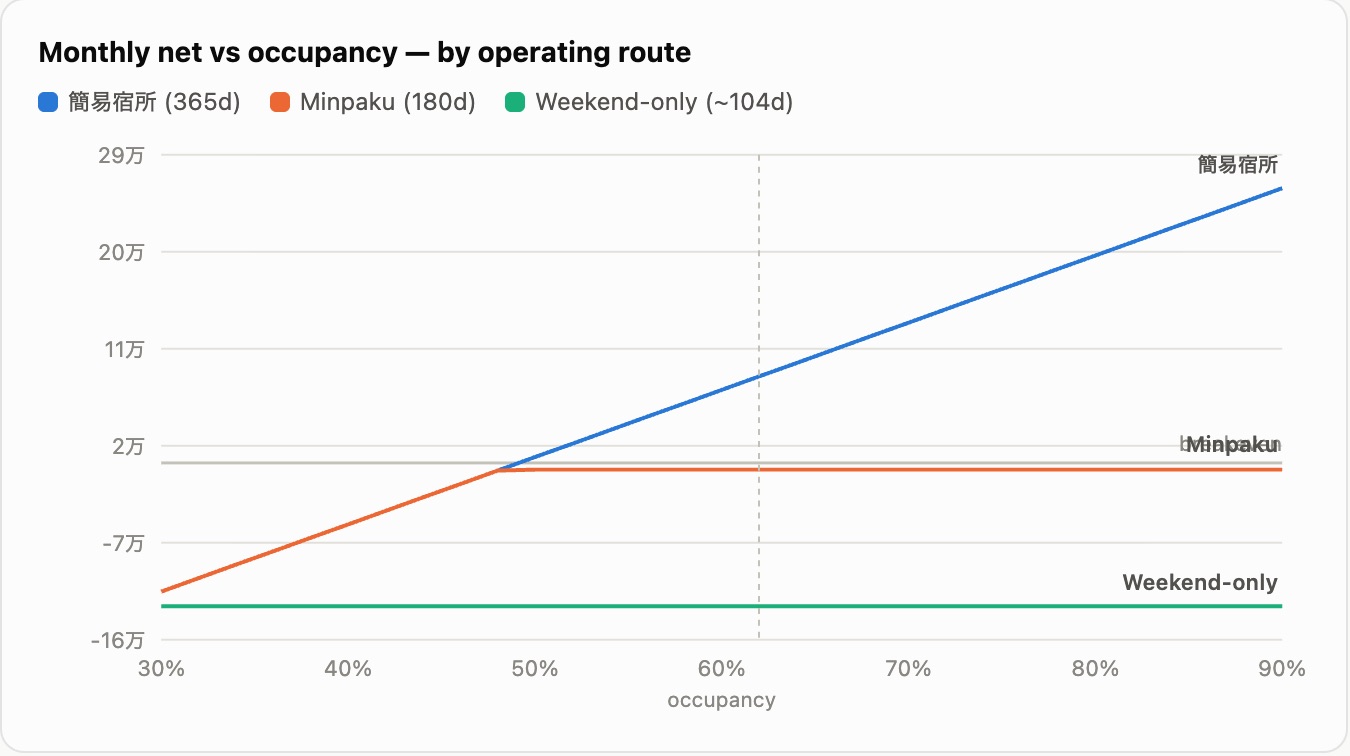
The calculator. Every marker has a “run the numbers” link that opens a breakeven calculator in a side panel, already filled in with that listing’s price and size. For land, it adds an estimate for building a house, using the floor-area limit from the zoning layer under the pin. There’s a yen/dollar switch too.
Where I sign off
- The fit rules are mine. Which zones count, how far from the station, how many bedrooms, which stations send an email. They live in one config file, not scattered through the code.
- The map isn’t the final word. Listing sites only give an address down to the neighborhood block, so pins are approximate. The zoning check uses the parcel’s own listed zoning, but before any offer I verify the parcel on the ward’s official map myself.
- Every expansion was my call. When I asked which other Tokyo wards allow the same remote setup, Claude compared all 23. Neighboring Shibuya, for example, started requiring on-site staff in July 2026. I picked Setagaya and Nakano to map and kept email alerts to the Togoshi corridor only.
What broke
- The listing site blocks bursts. About eight quick requests get a bot challenge, from my Mac and from Cloudflare alike. So the watcher takes small steps every hour, saves its place, and stops at the first challenge instead of pushing through. A full pass takes about ten hours.
- A missing page stalled it all night. One station had exactly 30 listings, so page two didn’t exist. The code treated that “not found” as a bot challenge, gave up, and retried the same page every hour. I asked how the overnight run went. It hadn’t moved for about eight hours. A “not found” now means the end of the list.
- A dropdown that did nothing. Choosing “Shinagawa” from the area menu looked like a no-op. Claude reproduced it: the map’s zoom animation stalled partway when the browser throttled it, so it never arrived. The menu now jumps straight there.
- The build cost was there, but invisible. For land, construction was folded into the purchase price, so it looked missing. It now has its own callout under the price.
What’s next
The watcher keeps running. On the list: a “new this week” badge, saving calculator scenarios in the link so I can share them, SUUMO as a second source, and retiring the older weekly Claude scheduled task that sent alerts before the Worker did.